
A processor can perform complex calculations, but controlling its internal peripherals requires software that understands the hardware’s registers, configuration rules, and operating requirements. This is where a Chip Support Library becomes useful. It gives embedded developers a structured way to configure and control supported hardware without writing every low-level operation from scratch.
In digital signal processing (DSP) and embedded development, the Chip Support Library (CSL) is a collection of application programming interfaces (APIs), macros, and supporting definitions designed for specific processor families. Texas Instruments, for example, provides CSL packages for several TMS320 DSP families, with functions for peripherals such as timers, direct memory access (DMA), GPIO, and communication interfaces.
Understanding this library involves more than knowing its definition. Developers also need to understand how its software layers interact with hardware, which modules are available for their processor, how to choose a compatible package, and why an application might still fail even when the correct library is installed.
This guide explains those details with practical examples, technical comparisons, and implementation guidance for beginners and experienced embedded programmers.
What Is a Chip Support Library?
A Chip Support Library is a hardware-specific software library that provides predefined functions for configuring and controlling a processor’s on-chip peripherals. Instead of manually handling every register address and bit field, a developer can use the library’s APIs to perform supported operations through a more organized programming interface.
For example, imagine developing an embedded application that needs to transfer data between memory and a peripheral. Without a suitable abstraction layer, the programmer may need to study the device’s technical reference manual, identify register addresses, configure control bits, and handle device-specific requirements. A CSL can provide functions and definitions that simplify these tasks.
The exact capabilities depend on the processor family. The TMS320C6000 CSL, for instance, documents modules for functions such as DMA, cache management, GPIO, interrupt handling, and external memory interfaces. Other CSL packages may provide different modules for their target devices.
An important distinction is that a CSL is not a universal library for every computer chip. A package developed for one processor family may be incompatible with another because peripheral layouts, registers, and supported operations differ. Developers must check the manufacturer’s documentation before integrating a library into a project.
Another distinction is that a CSL does not automatically provide a complete application, an operating system, or every required device driver. It supplies programming interfaces that developers use as part of a larger embedded software design.
In practical terms, a Chip Support Library helps bridge the gap between application code and hardware-specific operations. It can reduce repetitive programming work, make peripheral configuration more manageable, and improve code organization when used with a compatible processor and development environment.
How Does Chip Support Library Work?
A CSL works by providing a software interface between an embedded application and the processor’s hardware peripherals. Its main purpose is to make low-level hardware operations easier to manage while preserving the control required for embedded programming.
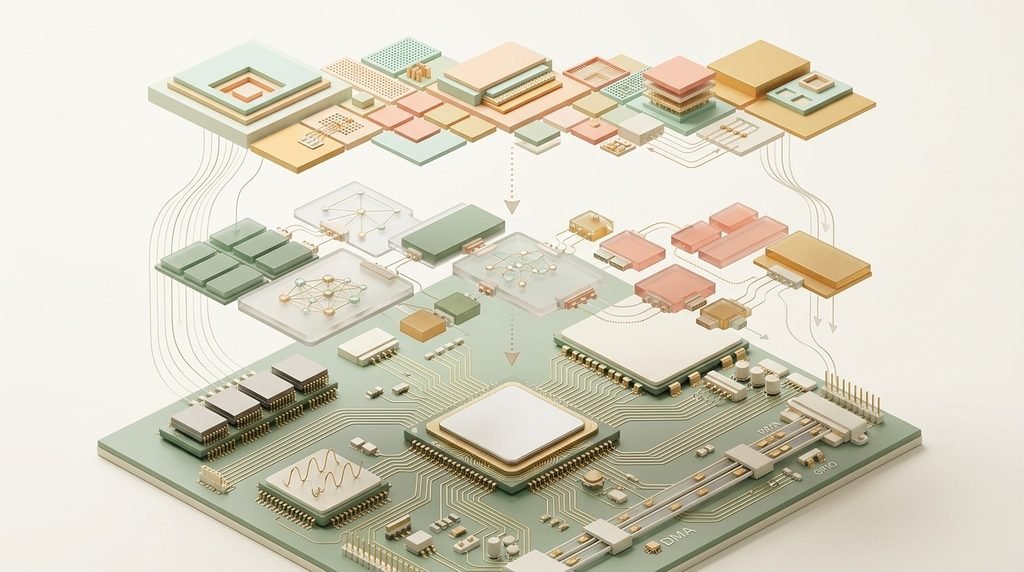
Many Texas Instruments CSL implementations use two conceptual layers: a register-level layer and a more abstract functional layer. The lower layer provides definitions and macros for accessing hardware registers, while the functional layer exposes C-language functions that simplify common peripheral operations. This architecture is documented in the TMS320C6472 CSL reference guide.
Consider a project that needs to configure a timer. The developer first identifies the correct timer peripheral and checks the processor’s technical documentation. The application then uses the relevant supported CSL interfaces to configure the timer, enable the required functionality, and respond to events according to the device’s programming model.
The general workflow involves application code calling CSL functions, which may use register-level operations to configure the required peripheral. The processor then performs the requested hardware operation. This is a conceptual model rather than a universal execution sequence because actual call paths differ between library implementations, and some operations may access registers directly through macros.
A library also cannot eliminate every hardware requirement. Clock configuration, pin multiplexing, interrupt routing, memory placement, and initialization order may still need attention. Developers must follow the processor’s reference manual and the relevant API guide rather than assuming every function handles all setup automatically.
The key advantage is that CSL provides an organized interface to hardware operations. It can reduce repetitive register manipulation, but developers remain responsible for correct configuration, error handling, timing, and system-level integration.
Key Features of Chip Support Library
The most useful features of a CSL are hardware abstraction, reusable APIs, peripheral-specific modules, and a consistent programming structure. Together, these features help developers manage the complexity of embedded software without hiding every detail of the underlying processor.
Hardware abstraction is particularly important. Register definitions and low-level macros give developers a structured way to work with hardware fields. Higher-level functions can simplify routine configuration, making application code easier to read and maintain. However, this abstraction is limited to the operations supported by the relevant library.
Modular architecture is another major feature. The TMS320C6000 documentation describes separate API modules for peripherals and system functions, including DMA, cache management, external memory interfaces, and interrupts. This organization makes it easier to find the functions associated with a particular task.
| Feature | Purpose | Practical example |
| Hardware abstraction | Simplifies register-level programming | Configure a supported peripheral |
| Peripheral APIs | Provides structured control functions | Initialize a timer |
| DMA support | Manages supported data-transfer hardware | Move samples between memory and a peripheral |
| Interrupt management | Supports interrupt configuration and handling | Respond to a hardware event |
| Symbolic definitions | Makes register fields easier to identify | Use named configuration constants |
| Portability support | Reduces some device-specific code changes | Adapt code to a compatible processor |
Another useful feature is resource management. Some CSL modules provide open and close operations, which can help manage peripherals with multiple channels. Their exact behavior and availability must be verified in the API documentation.
Developers should also distinguish API consistency from complete portability. Two processors may provide similarly named functions while differing in peripheral capabilities, configuration requirements, or supported parameters. A library can simplify migration, but it cannot guarantee that the same program will run unchanged on every device.
When evaluating a library, check its supported peripherals, compiler requirements, example projects, source availability, and documented limitations. These details often matter more than the feature list alone.
Common CSL Modules and Their Uses
A CSL is generally organized around hardware peripherals or related system functions. Understanding these modules helps developers select the correct APIs instead of searching through an entire library for every operation.
The modules available depend on the chip family. For example, Texas Instruments’ TMS320C6000 library documents modules associated with DMA, enhanced DMA, cache, GPIO, interrupt handling, and external memory interfaces. The C55x library supports a different set of peripherals, including timers, UART, SPI, and ADC-related functionality on specified devices.
| Module | Main function | Example application |
| GPIO | Controls supported digital input/output pins | Read a digital signal |
| TIMER | Configures hardware timing functions | Generate periodic events |
| DMA / EDMA | Supports hardware-assisted data transfers | Transfer audio samples |
| IRQ / INTC | Manages interrupt-related operations | Respond to peripheral events |
| CACHE | Supports cache-related configuration | Optimize supported memory operations |
| UART | Provides serial communication functions | Exchange diagnostic messages |
| SPI | Supports serial peripheral communication | Communicate with a compatible sensor |
| ADC | Supports analog-to-digital conversion where provided | Read an analog signal |
This is a general reference table, not a claim that all these modules exist in one CSL package. GPIO, UART, SPI, and ADC support must be confirmed for the exact processor and library version.
Consider an audio-processing application. A compatible DSP may receive samples through a serial interface, transfer data into memory using DMA, and process the samples in software. Interrupts can notify the application when a buffer is ready, while cache operations may be needed to maintain correct data visibility in systems with relevant cache and memory-coherency requirements.
Each module addresses a specific part of this workflow, but the application must coordinate them correctly. For instance, enabling an interrupt before its handler and associated state are ready may cause unexpected behavior. Likewise, DMA transfers can fail if the source address, destination address, transfer length, or alignment is invalid.
Another frequently overlooked detail is peripheral ownership. If an operating system, another driver, or a different software component already manages a hardware resource, direct CSL access may conflict with that management. The library’s documentation should clarify whether a module is intended for standalone use or integration with a particular software environment.
The practical lesson is to choose modules based on the actual hardware task, confirm device support, and understand the dependencies between them before writing application code.
Benefits of CSL in Embedded Systems
Embedded developers often work with limited memory, strict timing requirements, and hardware that behaves differently across processor families. A CSL can help manage these constraints by providing documented interfaces for common hardware operations.
One important benefit is reduced development effort. Instead of repeatedly implementing low-level register operations, developers can use available APIs and examples. This can make initialization code easier to write, review, and maintain. Texas Instruments identifies ease of peripheral programming and shorter development time among the benefits of its documented C6000 library.
Another benefit is improved code organization. Separating peripheral configuration from application logic makes it easier to identify which part of the software controls a timer, manages an interrupt, or configures a communication interface. This separation can simplify debugging and future maintenance.
A further advantage is conditional portability. When two supported devices provide compatible APIs, developers may be able to reuse substantial portions of their code. However, hardware differences can still require changes to initialization, timing, pin configuration, memory layout, or peripheral handling.
These benefits are relevant across several embedded applications. Industrial control systems may use timers and interrupts to coordinate monitoring and control tasks. Audio-processing systems may combine serial interfaces, DMA transfers, and signal-processing algorithms. Communication devices can use supported peripheral interfaces to exchange data, while embedded diagnostic systems may use serial communication to collect status information and identify failures.
These benefits do not mean that CSL automatically improves execution speed. A library can reduce development time without making the hardware itself faster. Runtime performance depends on the implementation, compiler optimizations, function overhead, memory access patterns, and system architecture.
Similarly, a library does not guarantee reliability or security. Developers must validate hardware configuration, test edge cases, follow the device’s electrical and timing requirements, and use appropriate error-handling techniques.
For small projects, a few carefully documented register operations may sometimes be sufficient. For larger systems with several peripherals, a suitable CSL can provide a more maintainable foundation, especially when the development team needs consistent interfaces and reusable configuration code.
Also Read: Digital Maze AI: How It Works and Key Benefits Explained
CSL vs Hardware Drivers: Key Differences
A Chip Support Library and a hardware driver are related concepts, but they are not necessarily interchangeable. Both can help software interact with hardware, yet their responsibilities depend on the architecture of the embedded system.
A CSL typically provides APIs or low-level definitions for configuring and controlling supported on-chip peripherals. A hardware driver may build on those interfaces, or it may access registers directly. Depending on the platform, a driver can also manage operating-system integration, device discovery, resource allocation, interrupts, and application-facing interfaces.
The distinction is particularly important when working with an embedded operating system. A peripheral may already be managed by an operating-system driver, so using a separate low-level interface to configure the same hardware can cause resource conflicts. Follow the platform’s recommended driver architecture rather than bypassing it without a clear reason.
| Comparison | Chip Support Library | Hardware driver |
| Primary purpose | Provides hardware configuration and control APIs | Enables a device or subsystem to operate within its software environment |
| Hardware access | May use APIs, macros, or register-level definitions | May use CSL, direct register access, or another hardware interface |
| Operating-system dependency | Depends on the specific implementation | May be OS-specific or designed for bare-metal use |
| Resource management | May provide basic peripheral open/close functions | May coordinate ownership and lifecycle of hardware resources |
| Application interface | Often relatively close to the hardware | May expose a higher-level device interface |
| Portability | Limited by processor and API compatibility | Depends on hardware, OS, and driver architecture |
Choose a CSL when your project needs supported low-level peripheral configuration and the library matches your processor and software environment. Use an existing device driver when your platform already provides one that manages the required peripheral. In an operating-system-based design, follow the platform’s recommended driver architecture rather than bypassing it without a clear reason.
The two approaches can also work together. A driver may call CSL functions internally to initialize hardware, configure interrupts, or control a peripheral. In that design, the application communicates through the driver’s interface while the driver uses the lower-level library as an implementation detail.
The correct choice depends on the target chip, available SDK, operating system, and peripheral ownership model. Checking these factors before implementation can prevent subtle initialization bugs and conflicts that are difficult to diagnose later.
How to Install Chip Support Library
Installation begins with identifying the exact processor rather than downloading the first package that matches the keyword. Manufacturers often provide separate releases for different DSP families, and their compiler requirements, examples, and supported APIs can vary.
Texas Instruments’ official CSL pages provide device-specific downloads and associated documentation. Depending on the release, a package may contain header files, precompiled libraries, source code, example projects, release notes, and user or API reference guides.
Identify your processor. Check the full part number printed on the chip or development board. A general description such as “TI DSP” is not sufficient to establish compatibility.
Locate the official package. Start with the manufacturer’s product page. For example, the official TMS320C6000 CSL page provides the library and related documentation for its listed processor family. For a different family, locate its specific CSL or SDK page.
Check prerequisites. Confirm the required compiler version, supported development environment, target architecture, and any operating-system dependencies. An older library may require legacy development tools rather than the latest IDE release.
Download and extract the files. Follow the instructions provided for the selected release. Keep source files, compiled libraries, headers, examples, and documentation organized within the project’s directory structure.
Configure the development project. Add the appropriate include directories and library files. Select the correct processor target and build configuration. Library filenames and linker settings vary between packages, so use the supplied examples and documentation rather than guessing.
Build and test a minimal example. Start with a documented example for a supported peripheral. Verify compilation and linking before adapting it to the full application.
Validate hardware behavior. Run the program on the target board and verify that the peripheral operates as expected. A successful build alone does not prove that clocks, pin configuration, interrupts, or external connections are correct.
One practical warning: do not mix headers, binaries, and examples from unrelated CSL versions. Mismatched files can create compiler errors, linker failures, or incorrect hardware behavior. Keep a record of the selected release and its prerequisites so that the project can be reproduced later.
Common CSL Issues and Their Fixes
Even when the correct library has been downloaded, embedded projects can encounter compilation errors, linker problems, initialization failures, and unexpected peripheral behavior. These issues are often caused by mismatched software versions or incomplete hardware configuration rather than a defect in the library itself.
A reliable debugging process begins by separating build-time errors from runtime failures. Compiler errors generally indicate problems with declarations, include paths, types, or language compatibility. Linker errors often point to missing library files, unresolved symbols, or incompatible build settings. Runtime problems may involve clocks, interrupts, peripheral configuration, memory access, or hardware connections.
| Problem | Likely cause | Recommended fix |
| Header file not found | Incorrect include directory | Verify project include paths |
| Undefined reference during linking | Missing or incompatible library | Check linked files and API availability |
| Peripheral does not respond | Incorrect initialization or clock configuration | Review the device reference manual |
| Interrupt never executes | Incorrect routing, masking, or handler setup | Verify the interrupt configuration |
| DMA transfer produces incorrect data | Invalid addresses, alignment, or buffer setup | Check transfer parameters and memory requirements |
| Example fails to compile | Toolchain or SDK mismatch | Match the example’s documented prerequisites |
A useful debugging technique is to test one peripheral at a time. Start with a minimal example, confirm that the processor initializes correctly, and then add additional modules gradually. This makes it easier to identify which change introduced the problem.
If a function returns an error code, inspect the return value instead of assuming the operation succeeded. Where the API provides status codes, consult the relevant reference guide to determine what each code means. Some hardware operations may also require checking register state or using a debugger to inspect memory and peripheral configuration.
Another frequent issue occurs when software uses an API that exists in a different library release but not in the selected version. Compare the header declarations, release notes, and example projects before changing the application code. Do not copy functions from unrelated processor families without confirming that the underlying hardware supports them.
For DMA and cache-related problems, verify memory accessibility, buffer alignment, transfer boundaries, and cache-coherency requirements where applicable. For interrupt-related failures, confirm that the handler is installed correctly and that the relevant interrupt source is enabled.
The best troubleshooting approach combines the library’s API reference, the processor’s technical reference manual, compiler diagnostics, and hardware-level testing. These sources provide different pieces of the information needed to identify the actual cause.
Ultimately, a Chip Support Library simplifies access to supported hardware functions, but successful implementation still requires careful configuration, version management, and systematic testing.
Frequently Asked Questions
Is a Chip Support Library a software application?
No. It is a collection of software interfaces, definitions, and supporting components used within an embedded development project. It is not generally a standalone application that users install and run like a desktop program.
Is CSL the same as a device driver?
Not necessarily. A CSL typically provides lower-level hardware configuration interfaces, while a device driver may manage the peripheral within an operating system or software framework. A driver can also use CSL internally.
Can I use one CSL package for every processor?
No. Compatibility depends on the target processor, peripheral architecture, API implementation, and library release. Always verify the manufacturer’s supported-device list.
Do I need C programming knowledge?
For most traditional CSL development, a working knowledge of C is important. Developers should understand functions, pointers, header files, compilation, linking, and basic embedded concepts such as registers and interrupts.
Where can I download the library?
Use the official manufacturer’s website and select the package that matches your processor. For supported TMS320C6000 devices, start with the official Texas Instruments CSL resource. Other processor families have their own packages and documentation.
Does CSL make embedded programs faster?
Not automatically. It can reduce development effort and simplify peripheral programming, but execution speed depends on the implementation, compiler, hardware, and system configuration.
Conclusion
A Chip Support Library is an important software component in many DSP and embedded development workflows. By providing structured APIs and hardware-related definitions, it can simplify peripheral configuration, improve code organization, and reduce repetitive low-level programming.
The most effective way to use one is to begin with the exact processor model, select a compatible library release, understand its available modules, and test individual peripherals before integrating the complete application. Developers should also consider operating-system requirements, resource ownership, memory constraints, and interrupt behavior.
The real value of CSL is not that it removes the need to understand hardware. Instead, it gives developers a more structured way to work with hardware while allowing them to focus on application logic, reliability, and system integration.

One Response