

Every successful business depends on clear and repeatable processes. But when those processes exist only in employees’ minds, companies often face delays, mistakes, inconsistent results, and knowledge gaps. This is where business process documentation becomes essential. It helps organizations record how tasks are completed, who is responsible, what tools are used, and how workflows can be improved.
Whether you manage a small company or a growing enterprise, proper process documentation creates a reliable system that allows teams to work faster and smarter. In this complete guide, you will learn what business process documentation is, why it matters, its key elements, and how businesses can create effective documentation for better workflows.
What Is Business Process Documentation?
Business process documentation is the practice of creating detailed written records that explain how a specific business process works from start to finish. It includes steps, responsibilities, tools, rules, and expected outcomes so employees can follow a consistent workflow.
A documented process acts like a roadmap for completing important business activities. Instead of relying on verbal instructions or individual experience, teams have a clear reference that explains exactly what needs to happen and how it should be done.
For example, imagine a company has a customer onboarding process. Without documentation, every employee may handle new customers differently. One person may send welcome emails immediately, another may forget important steps, and another may use outdated information.
With proper business process documentation, the company can define:
- The first step after receiving a new customer request
- The employee responsible for each task
- Required software or systems
- Approval requirements
- Expected completion timelines
- Quality standards
This creates consistency and reduces confusion.
Many businesses confuse process documentation with simple instructions or standard operating procedures (SOPs). While they are connected, process documentation is broader. An SOP usually explains how to complete a specific task, while process documentation describes the complete workflow, including the relationship between multiple tasks and departments.
For example:
A marketing team may have an SOP explaining how to publish a blog post. However, business process documentation may cover the complete content workflow:
- Keyword research
- Content planning
- Writing process
- Editing
- SEO review
- Approval
- Publishing
- Performance tracking
This wider view helps organizations understand how different activities connect together.
Modern businesses use process documentation for many areas, including:
- Human resources processes
- Customer support workflows
- Sales operations
- Finance procedures
- IT management
- Compliance processes
- Product development
A well-created document does more than explain tasks. It preserves business knowledge, improves collaboration, and allows companies to identify areas where automation or optimization can create better results.
In today’s fast-changing business environment, documented processes are no longer only useful for large companies. Small businesses, startups, and remote teams also depend on clear workflows to maintain efficiency and growth.
Why Every Business Needs Clear Process Documentation
Businesses often focus on increasing sales, improving products, and attracting customers, but internal processes are the foundation behind those goals. When workflows are unclear, even talented teams can struggle with productivity.
Business process documentation creates operational clarity by giving employees a structured system to follow. It removes uncertainty and ensures important tasks are completed correctly every time.
One of the biggest advantages is improved consistency. Without documented processes, results depend heavily on individual employees. When someone leaves the company or changes roles, valuable knowledge can disappear with them.
Documentation protects that knowledge by creating a central source of information.
For example, if a company’s IT team handles security checks differently every month, important issues may be missed. A documented security review process ensures every team member follows the same steps.
Clear documentation also helps new employees become productive faster. Instead of spending weeks learning through observation, new team members can study existing workflows and understand their responsibilities quickly.
Some major benefits include:
- Better employee training
- Reduced operational mistakes
- Faster decision-making
- Improved teamwork
- Easier business scaling
- Stronger quality control
Another important benefit is process improvement. Businesses cannot improve what they do not understand. Documentation allows companies to analyze existing workflows and identify unnecessary steps, repeated tasks, or areas causing delays.
For instance, a company may discover that customer requests pass through five unnecessary approval stages. After reviewing the documented workflow, management can simplify the process and improve response times.
Process documentation is also valuable during automation projects. Before implementing software or AI solutions, companies need to understand their current processes. A documented workflow helps identify which tasks can be automated and where human involvement is still required.
This is especially important for modern businesses using tools such as:
- Customer relationship management platforms
- Project management software
- AI assistants
- Workflow automation tools
- Enterprise resource planning systems
Clear documentation also supports compliance and risk management. Industries such as healthcare, finance, and technology often require businesses to prove that certain procedures are followed correctly.
A documented process provides evidence of internal controls and operational standards.
Businesses that invest in documentation usually create stronger systems because they are not dependent on individual memory. Instead, they build repeatable operations that support long-term growth.
Whether a company has five employees or five thousand, clear processes help everyone understand their role and contribute more effectively.

Essential Elements of Effective Process Documentation
Creating useful business process documentation requires more than writing a list of instructions. A strong document should provide enough detail for employees to understand the workflow while remaining simple enough to use in daily operations.
The quality of documentation depends on several important elements.
Clear Process Objective
Every documented process should begin with a clear purpose. Employees need to understand why the process exists and what outcome it should achieve.
For example:
A customer complaint handling process should explain that its goal is to resolve issues quickly while maintaining customer satisfaction.
Without a defined objective, teams may complete tasks without understanding their importance.
Process Scope
A good document should explain where the process starts and where it ends.
This prevents confusion about responsibilities.
For example:
A hiring process may begin when a department requests a new employee and end when the employee completes onboarding.
Defining scope helps teams understand boundaries and avoid unnecessary tasks.
Step-by-Step Workflow
The most important part of documentation is the workflow itself.
Each step should explain:
- What action needs to happen
- Who performs the action
- Which tools are required
- What information is needed
- What happens next
Clear steps make the process easier to follow and reduce errors.
Roles and Responsibilities
Every process should identify ownership.
Using frameworks like RACI (Responsible, Accountable, Consulted, Informed) can help businesses clarify who manages each part of the workflow.
When responsibilities are unclear, tasks often get delayed because everyone assumes someone else is handling them.
Required Tools and Resources
Documentation should mention the systems, software, templates, or resources needed to complete the process.
For example:
A content publishing workflow may require:
- Keyword research tools
- Content management system
- Editing checklist
- SEO guidelines
This helps employees access everything they need without wasting time.
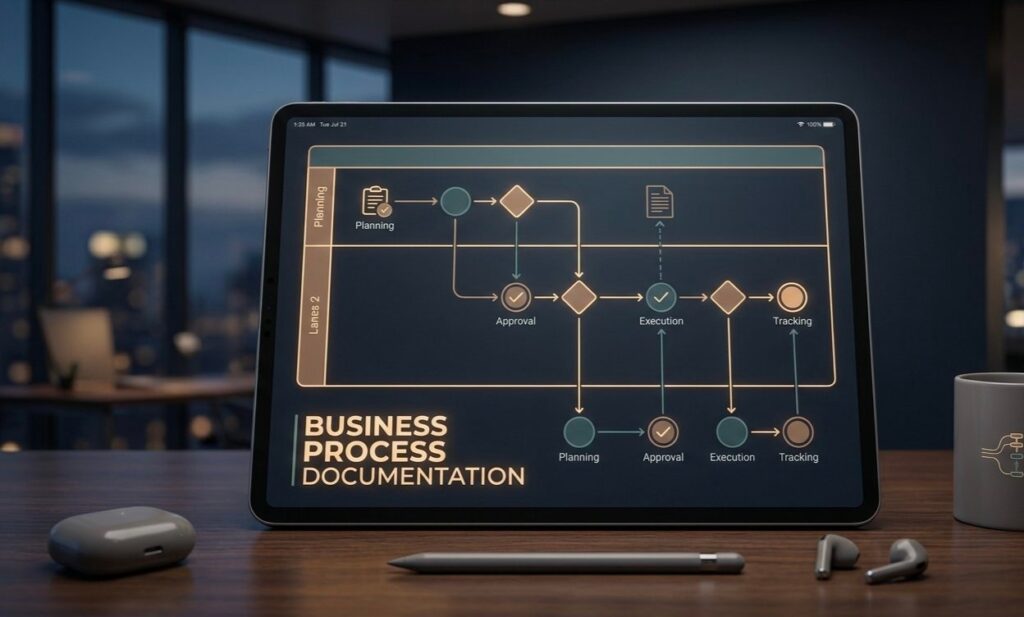
Visual Process Maps
Complex workflows are often easier to understand visually.
Businesses commonly use:
- Flowcharts
- Process diagrams
- Workflow maps
- Decision trees
Visual elements allow employees to understand relationships between different steps quickly.
Review and Update System
A process document should never remain unchanged forever.
Businesses evolve, and workflows need regular updates.
Effective documentation includes:
- Review dates
- Document owners
- Version numbers
- Change history
This ensures teams always use accurate information.
Practical Example
A managed IT service provider may document its client support process:
- Customer submits a support request.
- Ticket is created in the system.
- Technician evaluates priority.
- Issue is assigned.
- Solution is provided.
- Customer confirms resolution.
- Ticket is closed.
Each step creates accountability and makes service delivery more predictable.
Strong business process documentation combines clarity, structure, ownership, and continuous improvement. When these elements work together, documentation becomes a powerful tool for operational efficiency.
How to Create Business Process Documentation Step by Step
Creating effective business process documentation requires a structured approach. Many companies make the mistake of simply writing down tasks without understanding the complete workflow. Good documentation should explain how a process works, why each step exists, and how different team members contribute to the final result.
The first step is identifying the process that needs documentation. Businesses usually start with processes that are repeated frequently, involve multiple employees, or create problems when performed incorrectly. Examples include customer onboarding, employee hiring, invoice processing, IT support, content publishing, and product delivery workflows.
Before writing anything, define the purpose of the process. Ask questions such as:
What is the main goal of this process? Who is involved? What triggers the process? What should the final outcome look like?
A clear objective creates the foundation for accurate documentation.
The next step is collecting information from people who perform the process regularly. Employees who work directly with a workflow often understand small details that managers may overlook. Interviews, meetings, and workflow observations can help capture real operational knowledge.
After gathering information, map the current workflow. This means understanding the sequence of activities from beginning to end. At this stage, businesses should focus on documenting the existing process instead of immediately trying to improve it.
A simple process structure can look like this:
| Documentation Element | Purpose |
| Process Name | Identifies the workflow clearly |
| Objective | Explains why the process exists |
| Process Owner | Defines responsibility |
| Steps | Shows the complete workflow |
| Required Tools | Lists systems and resources |
| Expected Result | Defines the final outcome |
Once the workflow is mapped, write each step in simple language. Avoid complex technical terms unless they are necessary. The main purpose of documentation is helping employees understand and complete tasks correctly.
The next stage is reviewing the document with team members. A process may look clear to the person who created it but confusing to someone using it for the first time. Feedback helps identify missing steps, unclear instructions, or unnecessary details.
Testing the documented process is also important. Employees should follow the document and check whether they can complete the workflow successfully. If problems appear, update the documentation before making it available company-wide.
Finally, publish the process in an accessible location. Businesses often use knowledge bases, document management systems, project management platforms, or internal company portals.
Effective business process documentation is not created once and forgotten. It should become a living resource that improves as the organization grows and changes.
Common Mistakes That Reduce Documentation Quality
Many organizations understand the importance of documentation but fail to create useful resources because of avoidable mistakes. Poor documentation can create more confusion instead of improving workflows.
One common mistake is documenting processes that are too complicated. Some businesses include unnecessary details, making documents difficult to read and follow. Effective documentation should provide enough information to complete a task without overwhelming employees.
Another mistake is creating documentation without involving the people who actually perform the process. Managers may understand the overall workflow, but employees handling daily operations often know the practical challenges and exceptions.
For example, a customer support manager may document the ideal complaint resolution process, but support agents may know that certain customer issues require additional steps. Ignoring this experience can create incomplete documentation.
Another major issue is using outdated information. Businesses frequently change software, team structures, and procedures. If documentation is not updated, employees may follow instructions that no longer apply.
The following table explains common documentation problems and their impact:
| Common Mistake | Negative Impact |
| No clear process owner | Nobody maintains the document |
| Too much unnecessary information | Employees avoid using it |
| Missing workflow steps | Creates confusion and errors |
| No regular updates | Information becomes outdated |
| Poor organization | Difficult to find important details |
A lack of standard formatting is another problem. When every document follows a different structure, employees spend extra time searching for important information. A consistent template improves usability.
Businesses also often focus only on describing tasks but ignore the reason behind them. Understanding the purpose of each step helps employees make better decisions when unexpected situations occur.
Another mistake is failing to measure documentation effectiveness. Companies should evaluate whether documentation actually improves operations. Useful indicators include reduced errors, faster employee training, improved response times, and fewer repeated questions.
Poor documentation can also happen when organizations treat it as a one-time project. Processes change continuously, so documentation should evolve with the business.
High-quality business process documentation requires accuracy, simplicity, ownership, and regular improvement. Avoiding these mistakes helps organizations create resources that employees can trust and use effectively.
Best Tools for Business Process Documentation
Choosing the right tools can make business process documentation easier to create, organize, update, and share. The best tool depends on the size of the organization, complexity of workflows, collaboration needs, and existing technology environment.
Some businesses only need simple document platforms, while others require advanced process management systems with automation, workflow mapping, and analytics features.
A basic document editor can work well for small teams creating simple procedures. These platforms allow users to write instructions, add screenshots, organize information, and share documents with team members. However, as processes become more complex, specialized documentation tools provide better control and visibility.
The right business process documentation tool should help teams create structured workflows instead of storing random files.
Common features businesses should look for include:
- Easy document creation
- Collaboration options
- Version history
- Search functionality
- Templates
- Workflow diagrams
- Access control
- Integration with other business systems
Different tools serve different purposes. Some focus on knowledge management, while others specialize in workflow design and process automation.
| Tool Category | Best For | Main Purpose |
| Document Management Platforms | Small and medium teams | Creating and sharing process documents |
| Knowledge Base Software | Internal company knowledge | Organizing searchable information |
| Process Mapping Tools | Complex workflows | Creating visual process diagrams |
| Project Management Tools | Team collaboration | Managing process-related tasks |
| Business Process Management Software | Large organizations | Monitoring and improving workflows |
Knowledge management platforms are commonly used because they create a centralized location where employees can find important information. Instead of searching through emails or personal files, teams can access updated procedures from one place.
Process mapping tools are valuable when workflows include multiple departments or decision points. Visual diagrams help employees understand how different activities connect together.
For example, an employee onboarding process may involve HR, IT, finance, and department managers. A process map can clearly show when each team becomes involved and what responsibilities they have.
Many modern businesses also combine documentation tools with automation platforms. This allows companies to move beyond simply explaining processes and start improving them.
For example, a documented approval workflow can later be automated using business software. However, automation should only happen after the current process is clearly understood.
Another important consideration is usability. A powerful tool is not effective if employees find it difficult to access or update. The best documentation system is one that teams actually use regularly.
Businesses should also consider security and permission settings. Some processes contain sensitive information, so access should be controlled according to employee roles.
Ultimately, tools support the documentation process, but the quality of information remains the most important factor. A simple, well-maintained document is often more valuable than a complex system with outdated content.
Also Read: Best SaaS SEO Tools to Boost Your Website Rankings in 2026
Real Examples and Templates You Can Follow
Understanding real examples makes business process documentation easier because it shows how theoretical concepts work in practical situations.
Every business has unique workflows, but many processes follow similar structures. Using templates helps organizations create consistent documentation without starting from zero.
A good process template usually includes important information such as the process objective, responsible person, required resources, workflow steps, and expected results.
For example, a customer onboarding process can be documented by explaining every stage from the first customer interaction to successful account setup.
A simple customer onboarding documentation structure may include:
| Section | Example Information |
| Process Name | Customer Onboarding Workflow |
| Purpose | Successfully introduce new customers to services |
| Owner | Customer Success Team |
| Starting Point | Customer agreement completed |
| Main Steps | Account setup, training, follow-up |
| Final Outcome | Customer successfully begins using the service |
Another common example is an employee recruitment process.
Without documentation, hiring activities may become inconsistent. One department may follow detailed interviews, while another may skip important evaluation steps.
A documented recruitment workflow can explain:
The hiring request process. Candidate screening requirements. Interview stages. Approval process. Offer preparation. Employee onboarding steps.
This creates a repeatable system that improves hiring quality.
Businesses can also document IT support processes. Managed IT teams often create workflows for handling technical issues, system access requests, security incidents, and maintenance activities.
For example, an IT support process may define:
- How users submit requests
- How tickets are categorized
- Who handles different priority levels
- How solutions are recorded
- How issues are closed
Another useful template is the content publishing process. Many organizations create content but lack a consistent workflow.
A documented content process can include:
Research → Writing → Editing → SEO Review → Approval → Publishing → Performance Analysis
These examples show that documentation is not limited to one industry. Almost every business activity can benefit from a clear workflow.
When creating templates, businesses should avoid making them overly complex. A good template provides structure while allowing flexibility for different departments.
The goal is not to create paperwork. The goal is to make work easier, faster, and more predictable.
Effective templates also improve knowledge sharing. When employees understand how processes work, teams can collaborate better and maintain quality even during periods of growth or change.
Best Practices for Keeping Process Documentation Updated
Creating business process documentation is only the beginning. The real challenge is keeping it accurate as the business changes.
Many organizations create detailed documents but allow them to become outdated. Over time, employees stop trusting the information because it no longer reflects current workflows.
Regular maintenance ensures documentation remains useful.
One important practice is assigning ownership. Every process document should have a person or team responsible for reviewing and updating it.
Without ownership, documents often become neglected because everyone assumes someone else will maintain them.
Businesses should also create a regular review schedule. The frequency depends on how quickly the process changes.
For example:
- Frequently changing processes may need monthly reviews.
- Stable processes may require quarterly or yearly reviews.
Another important practice is tracking document versions. Version control helps teams understand what changed, when it changed, and who made the update.
A simple version system may include:
Version 1.0 – Initial documentation
Version 1.1 – Minor updates
Version 2.0 – Major workflow changes
Feedback from employees is also valuable. People using the process daily can identify problems faster than anyone else.
Organizations should encourage employees to report:
- Missing steps
- Incorrect information
- Unnecessary tasks
- New improvement ideas
Documentation should also be connected with continuous improvement. Businesses should not only update documents after problems occur. They should regularly analyze workflows to find opportunities for better efficiency.
Technology changes are another reason documentation needs attention. When companies introduce new software, automation systems, or security policies, related processes should be updated immediately.
A strong documentation management approach includes:
| Best Practice | Why It Matters |
| Assign document ownership | Creates accountability |
| Schedule regular reviews | Keeps information accurate |
| Collect employee feedback | Improves practical usefulness |
| Track versions | Maintains change history |
| Update after major changes | Prevents outdated instructions |
The best organizations treat documentation as an ongoing business asset rather than a static file.
When maintained properly, business process documentation supports employee performance, operational consistency, faster training, and long-term growth.
A well-managed documentation system allows businesses to adapt quickly because employees always have access to reliable information.